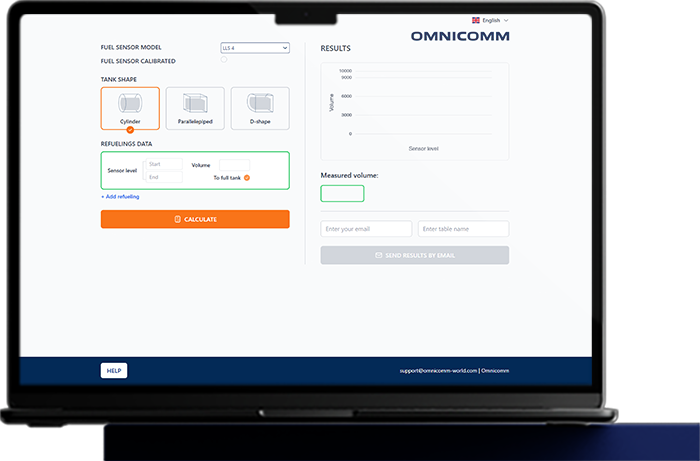
Omnicomm CalibrateX

Intelligent Tank Calibration Service

WHY IT’S IMPORTANT

The standard workflow for installing a fuel level sensor includes two key operations:

Omnicomm CalibrateX
Sensor calibration after trimming it to match the tank depth
This step ensures the sensor correctly identifies the “empty” and “full” points, effectively mapping the measurement scale from 0 to 4095 across its active length
Omnicomm CalibrateX
Fuel tank calibration
This creates a conversion table correlating fuel level with fuel volume, which is later used by the monitoring system

These two operations are time-consuming, require significant resources, involve handling fuel, and often demand bulky equipment and additional tools.

A traditional installation requires:

Investment in installation teams
Trained personnel
Installation time
Customer costs
(both direct and due to vehicle downtime)

HOW IT WORKS NOW

Measures the tank, drills a hole, and trims the sensor
20 min
Calibrates the sensor using a calibration tube
10 min
Installs the sensor
10 min
Performs the tank calibration
30-120 min
Connects the sensor to the GPS-tracker and seals the installation
10-60 min
THE INSTALLATION TAKES
4 HOURS
Most installations are performed on tanks of standard shapes.

However, simple geometric calculations without reference to the actual fuel level sensor still produce significant errors.
Omnicomm CalibrateX

WHAT IF WE COULD SIMPLIFY THE INSTALLATION?

Measures the tank, drills a hole, and trims the sensor
20 min
No calibration in a tube
0 min
Installs the sensor
10 min
No tank calibration
0 min
Connects the sensor to the GPS-tracker and seals the installation
10-60 min
TOTAL INSTALLATION TIME:
FROM 30 MINUTES

YOU WILL NO LONGER NEED TO BRING:

  • UNU-USB device for sensor configuration
  • Plastic calibration tube with plug (for Full-Empty calibration)
  • Calibration kit (pump, filter, flowmeter, nozzle) for automatic tank calibration
  • Reference gauge (10–20 L) for manual flowmeter calibration
  • Sufficient fuel to fill the tank to 100% for calibration
  • Laptop with Omnicomm Configurator installed

PROCESS

  • Install the sensor (no sensor or tank calibration needed).
  • Wait for 1–2 refueling events.
  • If the sensor is NOT calibrated, at least one refueling must fill the tank completely.
  • Enter the FMS data into the service (raw sensor data and the actual refueled volume).
  • Generate the calibration table.
  • Upload the table to the FMS

– No registration required
– Available in two languages

Frequently asked questions

What is tank calibration and why does it matter for fuel accuracy?

Tank calibration maps sensor readings to actual fuel volume in non-cylindrical tanks, where one centimeter of fuel level is not one liter of fuel. Without proper calibration even a perfectly accurate sensor reports wrong volumes. Manual calibration is the dominant labor cost in a deployment, typically running about 4 hours per tank against just 40 minutes for the sensor install itself. OMNICOMM CalibrateX eliminates the manual calibration step, cutting total installation time by roughly 70 percent.

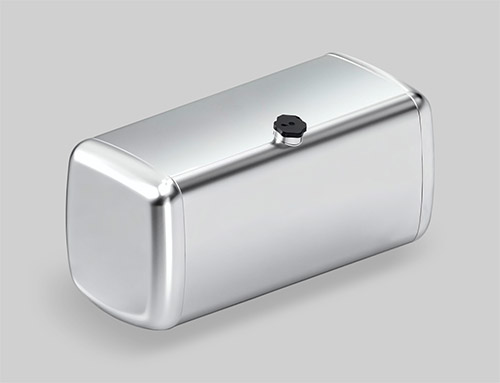
Most fuel tanks on commercial vehicles are irregular shapes designed to fit chassis constraints: rectangular with cut corners, D-shaped, saddle-shaped over rear axles, or split twin tanks connected by a balance line. In an irregular tank, the relationship between fuel level (measured by the sensor) and fuel volume (what you actually care about) is non-linear. You need a calibration table mapping every sensor reading to its corresponding volume in liters. Manual calibration involves emptying the tank, then pumping in known increments of fuel (typically 20 or 50 liters at a time) while recording the sensor reading at each step. For a 600-liter tank, that runs around 4 hours including drain and refill, doubling for twin-tank trucks. Across a 100-vehicle fleet, manual calibration alone can consume around 50 installer-days. CalibrateX replaces the manual step with software-driven measurement and pattern recognition, cutting total installation labor by about 70 percent. For partners running large rollouts, this turns calibration from a bottleneck into a routine step, and it is the reason CalibrateX is positioned as a key tool for the installer network.

How long does installation take?

A standard single-tank installation takes about 40 minutes for the sensor itself. Manual tank calibration after that takes another 4 hours per tank, which dominates the total time. CalibrateX, OMNICOMM's automatic tank calibration software launched in 2026, eliminates the manual calibration step entirely and reduces total installation time by roughly 70%. End-to-end implementation, from goal-setting through testing, training, and commissioning, typically takes 60 days for a full ROI-ready deployment using OMNICOMM's 10-step methodology.

OMNICOMM uses a 10-step deployment methodology that has been refined across 2 million+ sensor installations: defining goals, pre-installation audit, project development, installer training, installation and configuration, bench testing, real-data testing with the live fleet, commissioning, project completion review, and ongoing support. For a fleet of 50 vehicles, total elapsed time is around 60 days from contract to full operational status. Per-vehicle, the sensor install runs about 40 minutes, but manual calibration adds roughly 4 hours and is the real bottleneck. CalibrateX replaces the manual calibration step with software-driven measurement, which alone takes around 70 percent off the total installation labor. Partner-led installations and self-installations by trained fleet teams are both supported. For complex multi-tank vehicles (tankers, twin-tank trucks, off-road equipment with separate auxiliary tanks), an experienced installer is recommended, and OMNICOMM's partner network covers most regions worldwide.

What makes a fuel management system “automated”?

A fuel management system is automated when it captures fuel data without manual input, generates alerts and reports without operator intervention, and adjusts to changing conditions (fuel type, temperature, tank shape) without recalibration. OMNICOMM automates four layers: precision data capture (sensors report 24/7), data quality (FuelScan and LLS 6 AI smooth noise on the sensor), event detection (theft, idle, anomalies trigger alerts), and reporting (50+ reports update continuously).

Older fuel management approaches relied heavily on manual entries: driver-logged refuel amounts, paper trip sheets reconciled against fuel card statements weeks later, manual calibration every time the fuel type changed. The data quality was poor and the operational overhead was high. A modern automated fuel management system removes the manual touch points end to end. Sensors capture real fuel data autonomously, FuelScan auto-adapts when fuel composition changes, CalibrateX automates tank calibration during install, alerts fire automatically when patterns deviate, and reports refresh continuously without anyone running them. ERP integration via the REST API closes the loop by feeding fuel events directly into corporate accounting, so even the reconciliation step happens automatically. LLS 6 AI extends automation further by running a neural network on the sensor itself, eliminating data spikes before they reach the platform. A fleet manager logs in to see exceptions, not to compile reports.

All questions →